Modern ANSI code editor with UTF-8 powers Moderner ANSI-Code-Editor mit UTF-8-Power

NotepadPrime
Fast code editing. UTF‑8 icons. Classic Windows feel. Schnelles Coding. UTF‑8 Icons. Klassisches Windows-Gefühl.

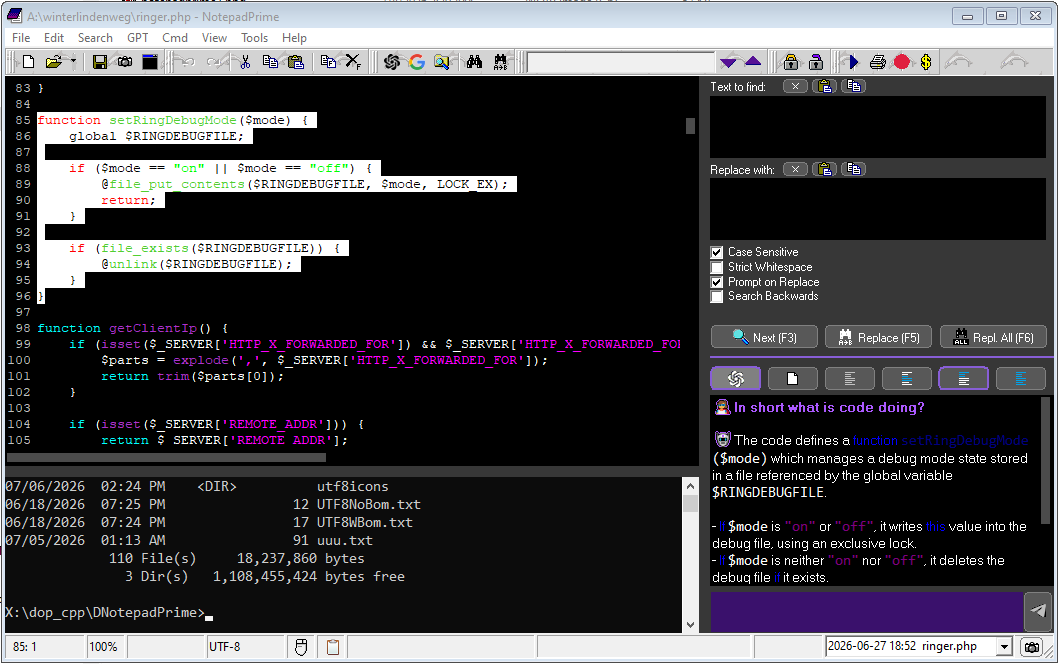
NotepadPrime is a native Windows editor built for practical code and text work: ANSI-friendly editing, UTF‑8 save/load, syntax highlighting, line numbers, function navigation, embedded console, smart shortcuts and an integrated AI icon finder.

NotepadPrime ist ein nativer Windows-Editor für praktische Code- und Textarbeit: ANSI-freundliches Editieren, UTF‑8 Speichern/Laden, Syntax-Highlighting, Zeilennummern, Funktionsnavigation, eingebettete Konsole, clevere Shortcuts und integrierter AI-Icon-Finder.

⬇ Download NotepadPrime.exe ⬇ NotepadPrime.exe herunterladen
Portable native Windows EXE.
Recommended: Windows 10 / 11.
Portable native Windows-EXE.
Empfohlen: Windows 10 / 11.
⚡ Native Windows 🌙 Night Mode 🔢 Line Numbers 🎨 Syntax Highlighting 🔎 Search / Replace 🤖 AI Icon Finder 💾 UTF‑8 Save 🧰 Explorer Integration
*Untitled - NotepadPrime ×
FileEditSearchHelp
📄 📂 💾 📷 ↶ ↷ ✂ 📋 ❌ 🤖 🌐 🔍 🔭 100%
1[[U+1F514]][[U+1F916]][[U+1F680]]
2function openMagic() {
3  // UTF‑8 icons stay portable as tokens
4  return "🚀";
5}
🚀
Icon Picker
rocketRakete
🚀🛰️🤖💎🔔🏠🔑🔎🌙⚙️

Classic VCL-style editor experience with modern conveniences: UTF‑8 token preview, integrated icon search and a compact native workflow.

Klassisches VCL-Editorgefühl mit modernen Komfortfunktionen: UTF‑8 Token-Vorschau, integrierte Icon-Suche und kompakter nativer Workflow.

Everything a small, fast code editor should do. Alles, was ein kleiner, schneller Code-Editor können sollte.

NotepadPrime focuses on real daily editing work: open fast, edit cleanly, navigate quickly, save safely. NotepadPrime konzentriert sich auf echte tägliche Editor-Arbeit: schnell öffnen, sauber bearbeiten, zügig navigieren, sicher speichern.

💾

UTF‑8 aware savingUTF‑8-bewusstes Speichern

  • Token layer for characters outside ANSIToken-Schicht für Zeichen außerhalb von ANSI
  • [[U+1F680]] becomes real UTF‑8 on save[[U+1F680]] wird beim Speichern echtes UTF‑8
  • Optional BOM handling, with safe behavior for batch filesOptionale BOM-Behandlung, sicher für Batch-Dateien
🎨

Code highlightingCode-Highlighting

  • Keywords, strings, comments and methodsKeywords, Strings, Kommentare und Methoden
  • Delayed colorizing for smoother typingVerzögertes Colorizing für flüssigeres Tippen
  • Night colors and normal colors configurableNight- und Standardfarben konfigurierbar
🔢

Line numbers & layoutZeilennummern & Layout

  • Clean gutter with dynamic widthSauberer Gutter mit dynamischer Breite
  • Word wrap toggleWord-Wrap umschaltbar
  • Zoom with toolbar and Ctrl + mouse wheelZoom per Toolbar und Strg + Mausrad
⌨️

Smart editing keysSmarte Editor-Tasten

  • Configurable Tab width: spaces or real tabsKonfigurierbare Tab-Breite: Leerzeichen oder echte Tabs
  • Multi-line indent and outdentMehrzeiliges Ein- und Ausrücken
  • Ctrl + / toggles line comments intelligentlyStrg + / schaltet Zeilenkommentare intelligent um
🤖

AI Icon FinderAI-Icon-Finder

  • Open with Ctrl + . inside the editorMit Strg + . direkt im Editor öffnen
  • Search natural words, copy icons instantlyNatürliche Begriffe suchen, Icons sofort kopieren
  • Compact embedded picker window for classic WindowsKompaktes eingebettetes Picker-Fenster für klassisches Windows
🔎

Search & replaceSuchen & Ersetzen

  • Find next / previous with optional case sensitivityVorwärts/rückwärts suchen, optional case-sensitive
  • Replace one, replace all or prompt before replacingEinzeln, alle oder mit Nachfrage ersetzen
  • Progress display for search hitsFortschrittsanzeige für Treffer
🧭

Function navigatorFunktionsnavigator

  • List recognized function namesErkannte Funktionsnamen auflisten
  • Jump to function instantlySofort zur Funktion springen
  • Copy, select or delete a whole function blockGanzen Funktionsblock kopieren, markieren oder löschen
🖱️

Windows integrationWindows-Integration

  • Register common text and code extensionsGängige Text- und Code-Endungen registrieren
  • “Edit with NotepadPrime” context menu„Edit with NotepadPrime“ im Kontextmenü
  • Drag & drop file opening and recent filesDateien per Drag & Drop öffnen und Recent Files
🖥️

Embedded consoleEingebettete Konsole

  • Optional command panel inside the editorOptionales CMD-Panel direkt im Editor
  • Starts in the current file directoryStartet im Verzeichnis der aktuellen Datei
  • Auto-restart behavior for a reliable terminal panelAuto-Restart für ein zuverlässiges Terminal-Panel

A practical UTF‑8 workflow for classic ANSI editing. Ein praktischer UTF‑8-Workflow für klassisches ANSI-Editing.

The editor stays compatible with the old VCL/RichEdit world while still letting you use modern Unicode characters safely. Der Editor bleibt kompatibel mit der alten VCL/RichEdit-Welt und erlaubt trotzdem moderne Unicode-Zeichen.

01
Paste UnicodeUnicode einfügen Paste emoji or non-ANSI text from the clipboard. Emoji oder Nicht-ANSI-Text aus der Zwischenablage einfügen.
02
Edit as tokensAls Token bearbeiten Characters are represented as readable [[U+...]] tokens. Zeichen werden als lesbare [[U+...]]-Tokens dargestellt.
03
Preview on hoverVorschau per Hover Hold Ctrl over a token to preview the real icon. Strg über einem Token halten, um das echte Icon zu sehen.
04
Save as UTF‑8Als UTF‑8 speichern On save, tokens are converted back to real Unicode text. Beim Speichern werden Tokens wieder zu echtem Unicode.
AreaBereich
Classic Notepad styleKlassischer Notepad-Stil
NotepadPrime
UTF‑8
Can be fragile in ANSI-era componentsKann in ANSI-Komponenten fragil sein
Token-safe edit model, UTF‑8 outputToken-sicheres Edit-Modell, UTF‑8-Ausgabe
CodingCoding
Plain text onlyNur Plain Text
Syntax highlighting, comments, tabs, function listSyntax-Highlighting, Kommentare, Tabs, Funktionsliste
WorkflowWorkflow
Separate tools neededSeparate Tools nötig
Explorer integration, recent files, embedded terminalExplorer-Integration, Recent Files, eingebettete Konsole
IconsIcons
Manual copy/searchManuell suchen/kopieren
Integrated AI icon finder with instant clipboard copyIntegrierter AI-Icon-Finder mit direktem Clipboard-Copy

Ready for a tiny editor with serious tricks? Bereit für einen kleinen Editor mit großen Tricks?

Download the portable EXE, open a code file and press Ctrl + . to try the icon finder. Portable EXE herunterladen, Code-Datei öffnen und mit Strg + . den Icon-Finder testen.

⬇ Download ⬇ Download